Everything you'd open as a drive. In one place.

Folders on your SSH servers, ISO and VHD disk images, your computer's own partitions, a tidy view of a messy folder, and RAM disks. Each one a real drive in Explorer or Files, and in every app's Open box. Mountie sits in your tray and mounts what you ask, when you ask.

Free for personal and community use · Windows and Linux
The Mountie window, Folders tab: DownloadFiles, a view of Downloads without the folders, installers and archives, mounted as a drive

Six kinds of drive, one little app

Each kind has its own tab. Add one, give it a name, and Mount it. Tick Mount at start and it's there every time.

SSH servers

A folder on any server you can SSH into, as a drive: a drive letter on Windows, a folder in Files on Linux. Password, key file or your SSH agent. The server's key is checked and remembered. Act as root or www-data through sudo, so /var/www is yours to edit.

ISO disk images

ISO and IMG files open like a CD or a USB stick. Mountie reads each one first and tells you what it is: its label, its format and its size.

VHD virtual disks

VHD and VHDX, plus IMG, VMDK and QCOW2 on Linux. Every partition inside becomes a drive of its own.

Disks partitions

Your computer's own disks and sticks, mounted and unmounted with a click. The ones it runs from are left well alone.

Folders a tidy view

Any folder of yours as a drive of its own, showing only what you want. Tick the usual suspects (installers, archives, half-finished downloads, folders, hidden files) or write rules the way a .gitignore does, and see the result as you type.

RAM fast

A RAM disk of the size you choose. Gone when you stop, or tell it to keep what's on it: it's saved on the way down and back on the way up.
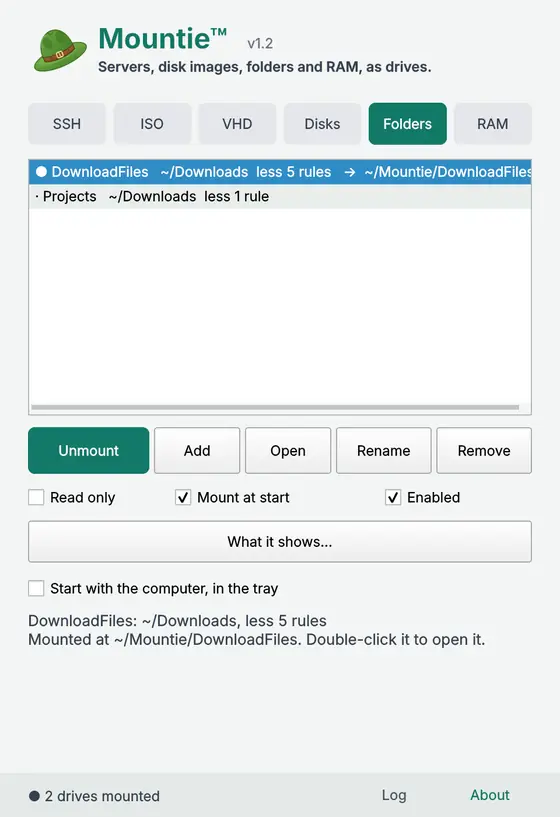
Ready to tidy your Downloads folder? Don't. Mount it as DownloadFiles, showing just the files you actually want, and leave the rest where it is. Everything that opens files sees the tidy version, so nobody bullies you into housekeeping.

Lives quietly in your tray

Close the window and your drives stay put. The hat's menu has every drive with a dot that shows how it is: click one to mount it or unmount it.

A terminal, right there

Right-click a drive, or use the hat's menu, to open a terminal in it. For a server, that's an SSH session already in the drive's folder, as its Act as user if it has one.

Starts with your computer

Tick one box and Mountie starts at sign-in, straight to the tray, and mounts the drives you've marked. Nothing to remember.

Tells you when something's wrong

A server out of reach, a file that's moved: it goes in the log, and the Log button turns amber until you've looked. Copy the log in one click if you need help.

Your secrets stay put

Passwords and keys are kept on your own computer, readable only by you. Mountie has no account, no cloud and nothing to sign up to.

Pricing

Free for people. Businesses pay, so it can keep getting better.

Community
£0
free forever
  • Personal and home use
  • Schools, charities and open-source projects
  • Every feature, no time limit
Business
Let's talk
for companies and teams
  • Use at work, on as many computers as you need
  • Invoicing, and help setting it up
  • Priority support
Email us

Download Mountie

Windows 10 and 11

Download for Windows

No admin needed to install. For the fastest SSH drives, install WinFsp too (free); without it, Mountie uses Windows' own WebDAV client. Windows may warn you about a new program: click More info, then Run anyway. A Microsoft Store version is on its way. Prefer no installer? Take the portable zip.

Linux (Ubuntu 22.04+ and similar, in a terminal)

curl -fsSL https://github.com/wallisoft/mountie-releases/releases/latest/download/install.sh | bash

Installs into your home folder and adds Mountie to your app menu. It asks for your password only to add sshfs and fuse3 if they're missing.